前言
在第8章的教程中,幽络源在vue2项目中对接了后端的登录接口,并实现且测试了权限的查询,另外还处理了跨域同源策略的问题,但是我们在使用非超管账号去请求一个他没有权限的接口时,前段直接显示了红色403界面,这显然对用户来说是不合理的,我们还需对认证和鉴权失败加上合理的处理方式。
知晓Security自带的认证鉴权异常
在SpringSecurity中,认证出现异常时,会调用Security的AuthenticationEntryPoint的方法去处理,而鉴权出现异常时,则会调用Security的AccessDeniedHandler的方法去处理,这里要知道,我们的认证鉴权时,都是在Security的过滤连中,因此直接想通过全局异常处理是不可能的,因此这里我们直接就重写Security的AuthenticationEntryPoint和AccesseniedHandler。
重写Security的认证鉴权异常处理方法
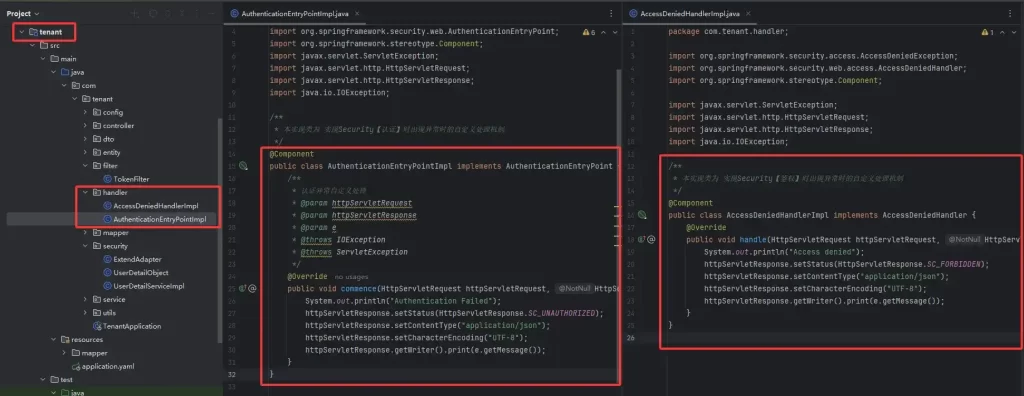
在我们的ttenant模块下新建handler包,创建两个类,分别名为AuthenticationEntryPointImpl和AccessDeniedHandlerImpl,然后重写其方法,代码与图如下
/**
 * 本实现类为 实现Security【认证】时出现异常时的自定义处理机制
 */
@Component
public class AuthenticationEntryPointImpl implements AuthenticationEntryPoint {
    /**
     * 认证异常自定义处理
     * @param httpServletRequest
     * @param httpServletResponse
     * @param e
     * @throws IOException
     * @throws ServletException
     */
    @Override
    public void commence(HttpServletRequest httpServletRequest, HttpServletResponse httpServletResponse, AuthenticationException e) throws IOException, ServletException {
        System.out.println("Authentication Failed");
        httpServletResponse.setStatus(HttpServletResponse.SC_UNAUTHORIZED);
        httpServletResponse.setContentType("application/json");
        httpServletResponse.setCharacterEncoding("UTF-8");
        httpServletResponse.getWriter().print(e.getMessage());
    }
}
/**
* 本实现类为 实现Security【鉴权】时出现异常时的自定义处理机制
*/
@Component
public class AccessDeniedHandlerImpl implements AccessDeniedHandler {
@Override
public void handle(HttpServletRequest httpServletRequest, HttpServletResponse httpServletResponse, AccessDeniedException e) throws IOException, ServletException {
System.out.println("Access denied");
httpServletResponse.setStatus(HttpServletResponse.SC_FORBIDDEN);
httpServletResponse.setContentType("application/json");
httpServletResponse.setCharacterEncoding("UTF-8");
httpServletResponse.getWriter().print(e.getMessage());
}
}
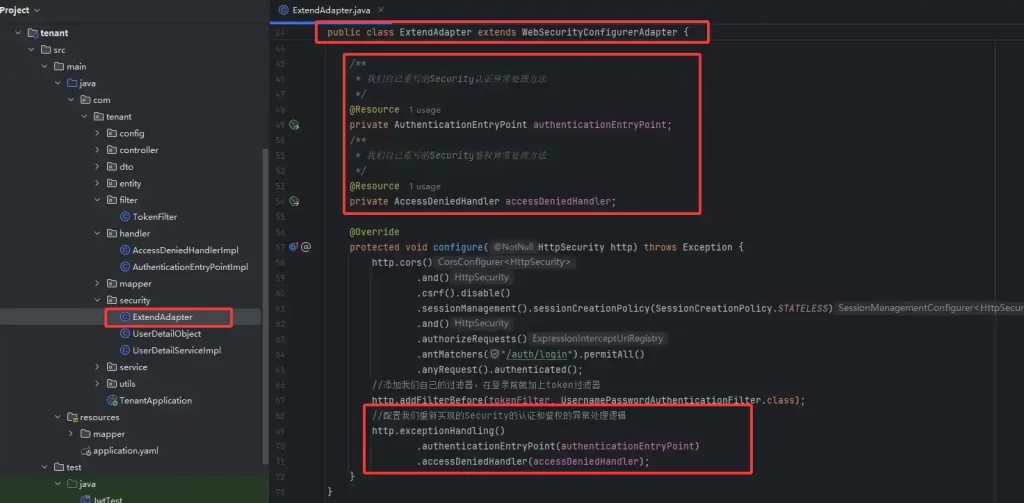
重写了Security的认证和鉴权处理方法后,我们还需要将其配置到Security中,直接在Security的配置实现类中添加即可,代码与图如下
@Configuration
public class ExtendAdapter extends WebSecurityConfigurerAdapter {

    @Bean
    public BCryptPasswordEncoder passwordEncoder() {
        return new BCryptPasswordEncoder();
    }

    /**
     * security的认证管理器
     * @return
     * @throws Exception
     */
    @Bean
    @Override
    public AuthenticationManager authenticationManagerBean() throws Exception {
        return super.authenticationManagerBean();
    }

    @Resource
    private TokenFilter tokenFilter;

    /**
     * 我们自己重写的Security认证异常处理方法
     */
    @Resource
    private AuthenticationEntryPoint authenticationEntryPoint;
    /**
     * 我们自己重写的Security鉴权异常处理方法
     */
    @Resource
    private AccessDeniedHandler accessDeniedHandler;

    @Override
    protected void configure(HttpSecurity http) throws Exception {
        http.cors()
                .and()
                .csrf().disable()
                .sessionManagement().sessionCreationPolicy(SessionCreationPolicy.STATELESS)
                .and()
                .authorizeRequests()
                .antMatchers("/auth/login").permitAll()
                .anyRequest().authenticated();
        //添加我们自己的过滤器,在登录前就加上token过滤器
        http.addFilterBefore(tokenFilter, UsernamePasswordAuthenticationFilter.class);
        //配置我们重新实现的Security的认证和鉴权的异常处理逻辑
        http.exceptionHandling()
                .authenticationEntryPoint(authenticationEntryPoint)
                .accessDeniedHandler(accessDeniedHandler);
    }
}
Axios封装完善响应拦截器
在上面的后端认证鉴权异常时,我们的处理方式为:
当认证失败时,响应的状态码为401;当鉴权失败时,响应的状态码为403。
因此我们在响应拦截器出就继续开发专门针对401、403的响应拦截处理逻辑。
代码与图如下
// 响应拦截器
api.interceptors.response.use(
    response => response.data, // 直接返回data
    error => {
        if (error.response.status === 401) { // 401: Token 无效或未登录
            localStorage.removeItem('jwt_token')
            Message.error("用户认证异常")
            setTimeout(() => {
                window.location.href = '/login' // 跳转到登录页
            }, 1500)
        }else if (error.response.status === 403) { // 403: 无权限访问
            Message.error("无权限访问")
            console.log("无权限访问")
        }else { // 其他错误(如 500 服务器错误)
            Message.error(error.message)
        }
        //return Promise.reject(error)
        return Promise.resolve({
            code: error.response.status,
            message: error.response?.data?.message || '请求失败'
        })
    }
)
测试认证失败
幽络源这里先把响应拦截器中的认证失败处理的跳转到登录页的代码注释掉,方便观察理解。
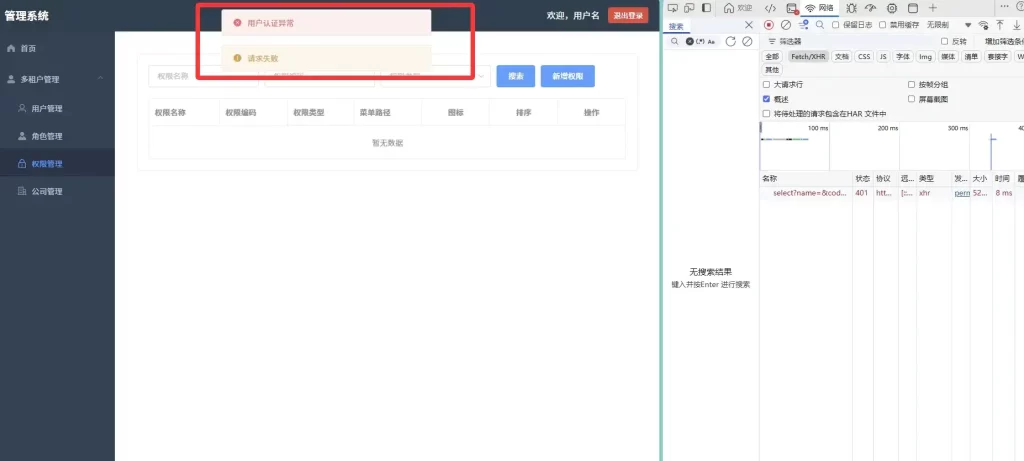
所谓认证失败,就是认证不通过,认证不通过的原因有例如JWT解析异常,导致认证对象为空,因此认证失败,进入到Security的认证失败处理机制中。
登录 超管superadmin用户,然后来到权限管理处,在浏览器的 f12中将jwt随便删掉一个字母让jwt解析异常就行,如图

我们再次刷新界面,可以看到如图如幽络源所料弹出了认证异常的提示。
测试鉴权失败
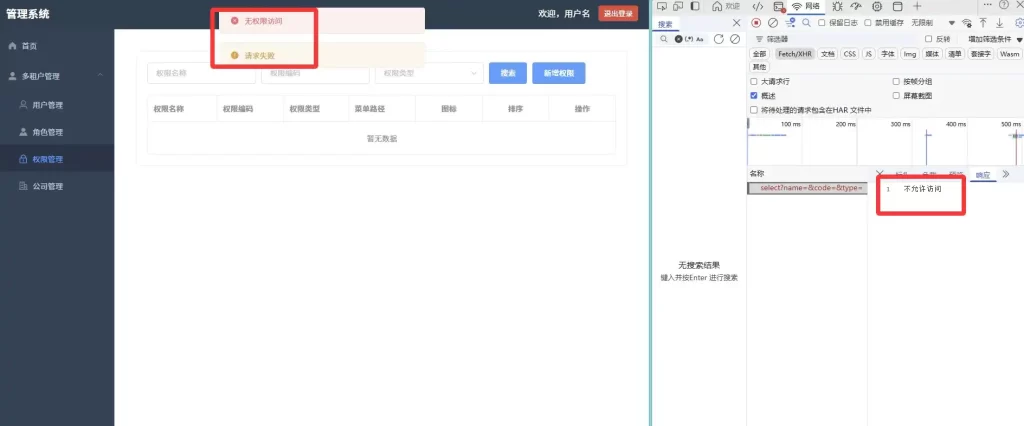
测试鉴权失败,我们只需要登录一个没有具体接口的权限,但是又去访问这个接口即可,我们登录 admin 用户,幽络源所提供的数据表中,admin用户是没有查询权限接口的权限的,superadmin和user1是有的。
上面幽络源测试认证失败时将 localStorage.removeItem(‘jwt_token’) 注释了的,这里我恢复下,不然退出登录jwt_token不会正常清掉。
登录 admin 用户,来到权限管理 页,可以看到如图如我们所料提示了无权限访问
源码
https://pan.quark.cn/s/6876f42a3af3
结语
如上为幽络源的9、幽络源微服务实战:Security认证鉴权异常处理方法重写+Axios响应拦截器封装完善教程,如有疑问或对微服务感兴趣可加入我们的QQ群询问与交流:307531422